Open source · MIT · early development

Alerts deserve an inbox, not a chat channel.

achtunk8s is a self-hosted alert inbox for Alertmanager and Kubernetes alerts, with a native macOS app. Every alert keeps its identity and history, and you see at a glance what is new and what is still broken.

A tour of the app in demo mode, with made-up alerts.

Chat is the wrong tool for alerts

Alertmanager posting into an MS Teams channel (or any chat) is how many teams get their alerts. It is bad to use and bad to run.

  • Hard to read

    Cards are hard to scan, firing and resolved look almost the same, and you can't tell what is new.

  • Late or lost

    Teams throttles incoming webhooks, so alerts arrive late or not at all, often in the busiest incidents.

  • Fiddly to set up

    Connectors and workflows are fragile to configure and break quietly.

  • The wrong model

    An alert is not a chat message. It has an identity, labels and a lifecycle from firing to resolved, and it needs handling, not replies.

Built for alerts

A server that tracks your alerts, and a native Mac app where UI and UX come first: calm, fast, keyboard-friendly, and always clear about what is new and what is still broken.

Home: every Alertmanager at a glance

Each Alertmanager is a tile, counted by the Alertmanager itself: open alerts by severity, silenced and inhibited ones, whether its Watchdog still fires and whether Grafana IRM receives its heartbeat.

Home also flags broken delivery: alerts Alertmanager should have sent but didn't, and alerts still firing here that Alertmanager has dropped. Below the tiles: silences ending soon, the noisiest alerts of the day and the longest firing ones.
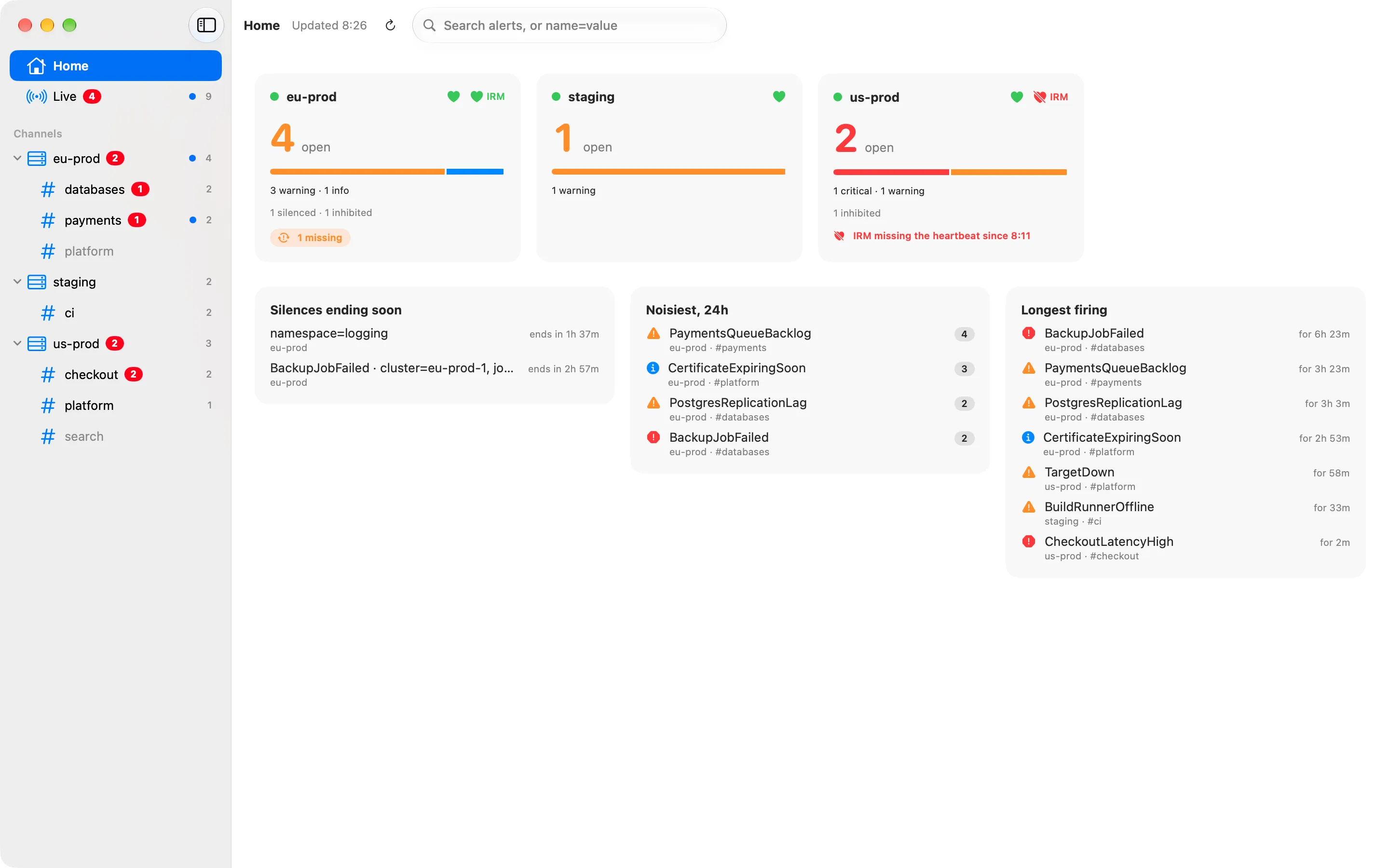
Home in the macOS app: a tile per Alertmanager with open alerts by severity, silenced and inhibited counts, its Watchdog and IRM heartbeat, and lists of silences ending soon and the noisiest alerts.

Live, and what's new since you last looked

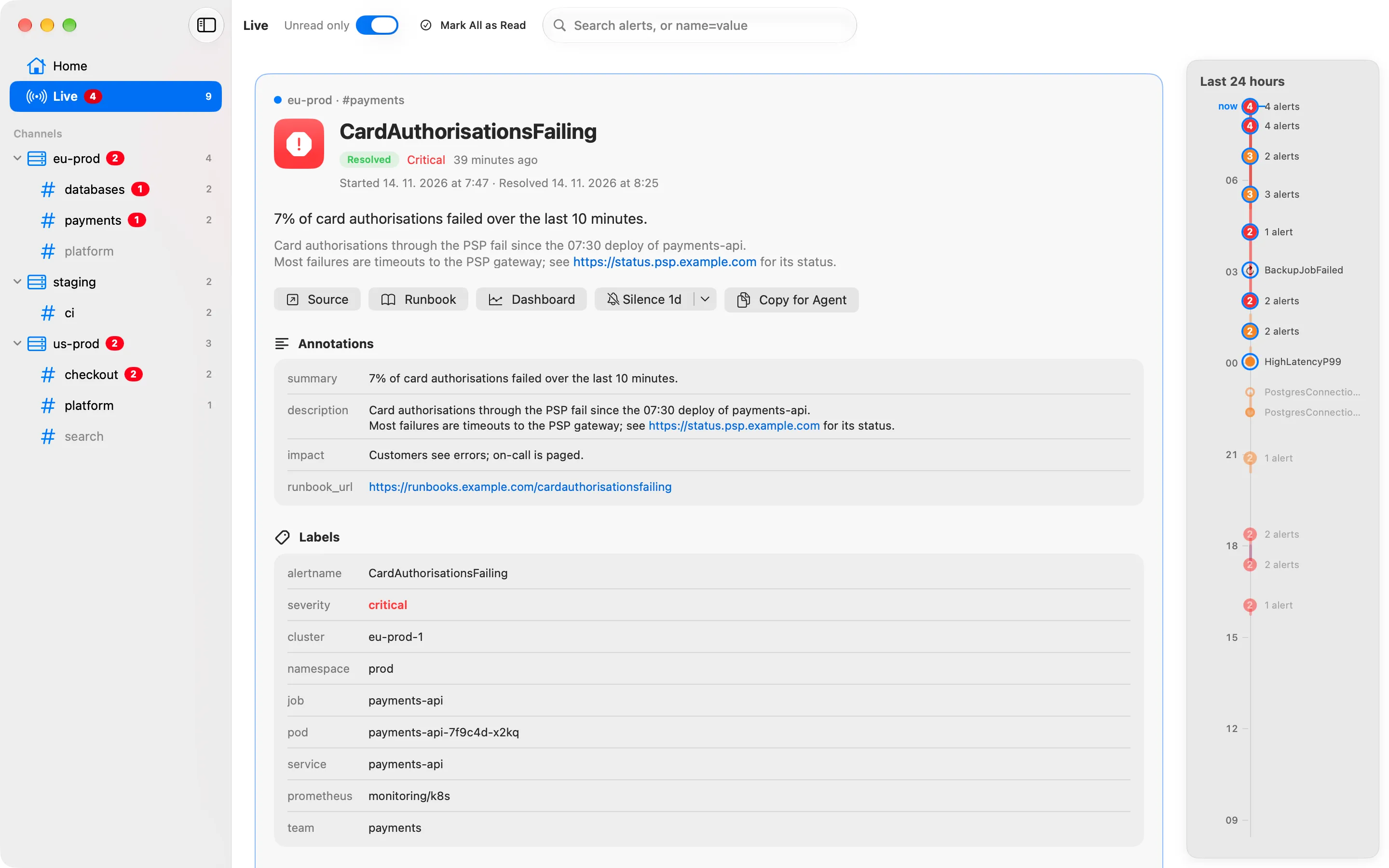
Live shows every channel in one stream, newest change first. Each channel and Live list only what is new until you switch Unread only off, and Mark All as Read (⇧⌘K) clears a list in one go.

Channels sit under the Alertmanager they come from, one instance per cluster. Pointing a receiver at a new URL creates the channel: nothing to set up per channel.

Live in the macOS app: alerts from every channel in one stream, unread ones marked, critical ones in red.

One alert, with its history

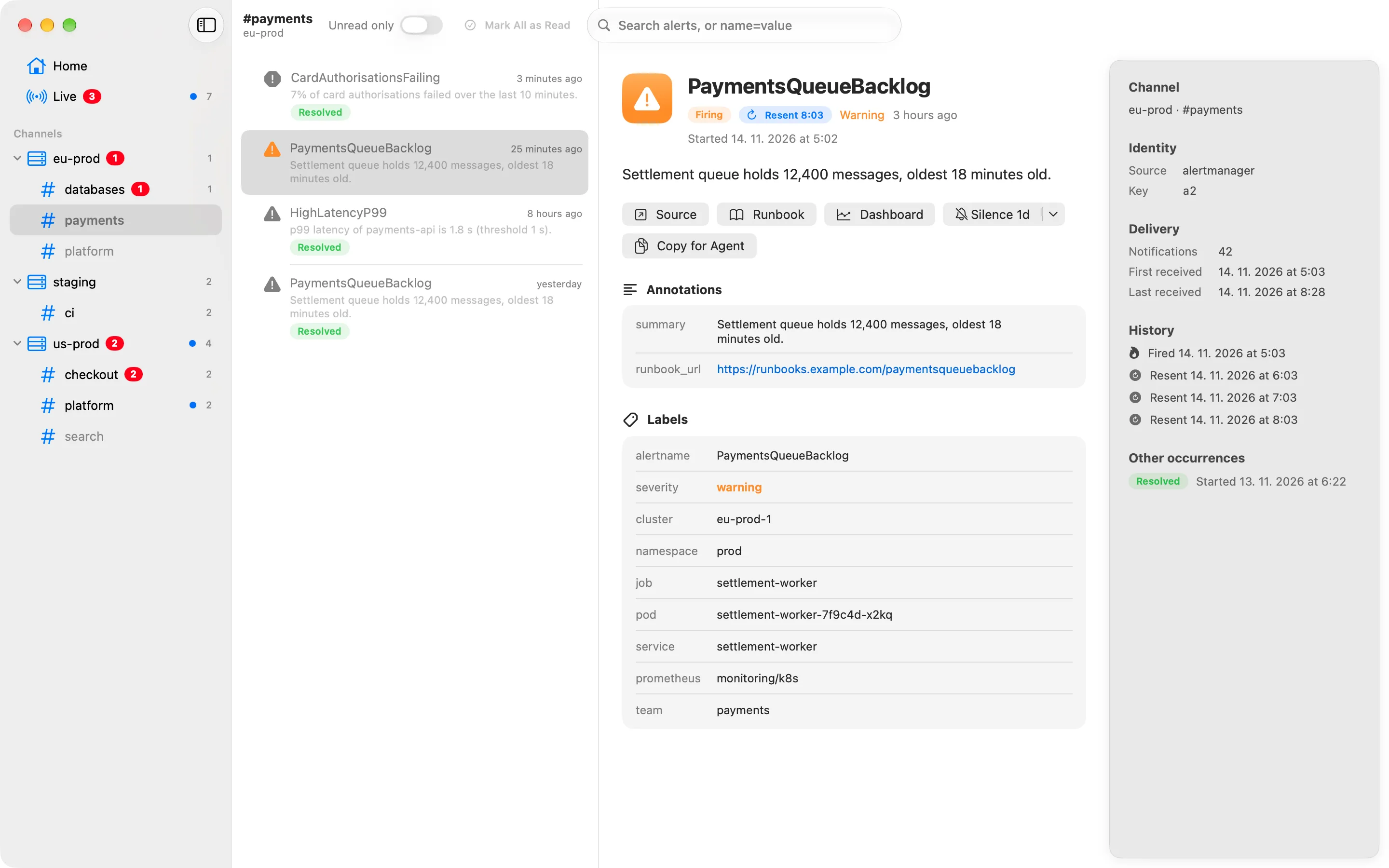
achtunk8s recognizes an alert every time it fires. A repeat notification updates it in place instead of adding another message. An alert that keeps firing resurfaces as resent, at most once an hour, marked differently from a new one.

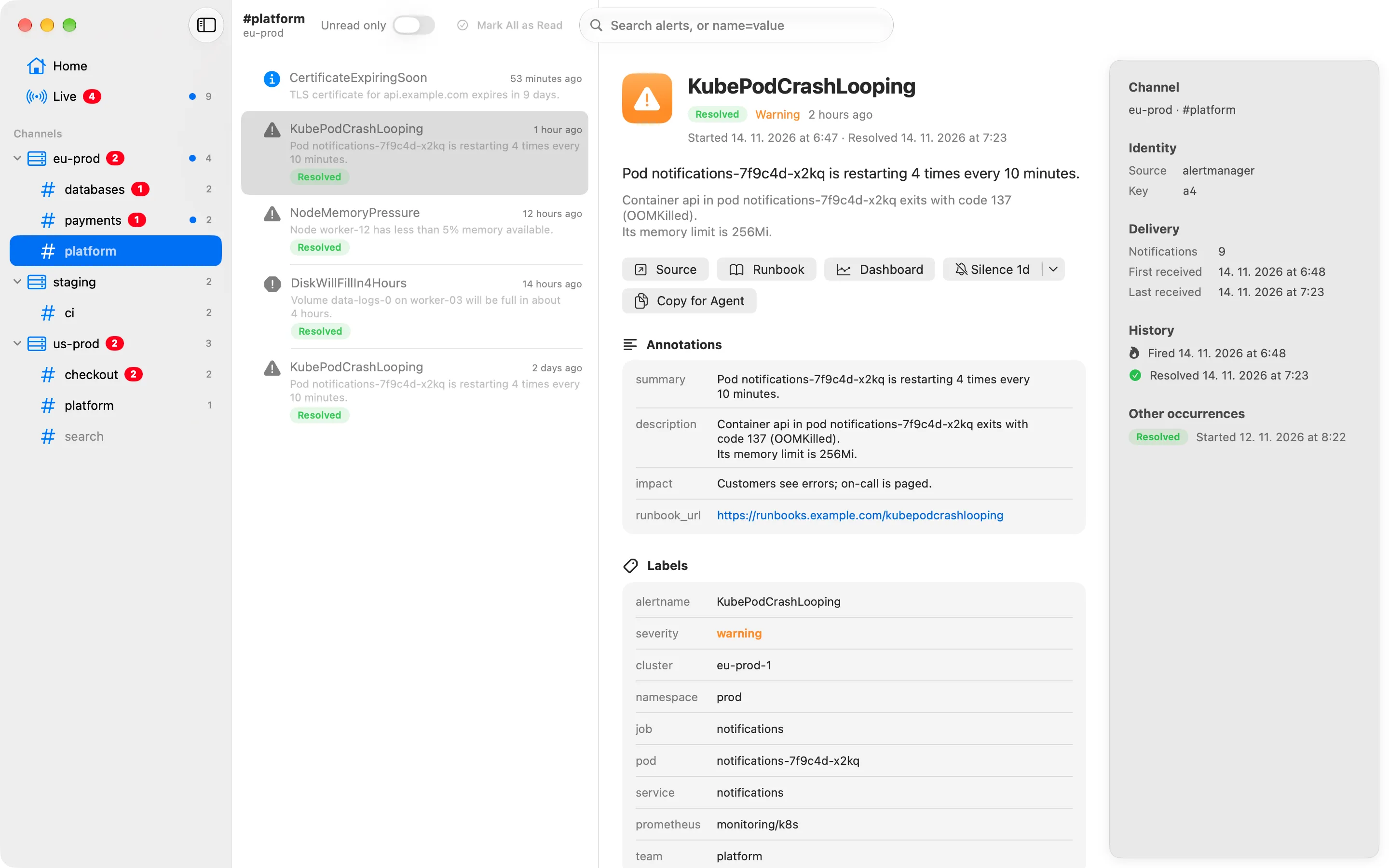
A new firing becomes a new occurrence of the same alert, and every occurrence lists the alert's earlier ones with their status and start time.

An alert that kept firing, resurfaced as resent, with a marker that sets it apart from a new alert.

Readable alerts, ready for an agent

The summary and description read as prose, links to the runbook, dashboard or Prometheus expression are buttons, and every label and annotation sits on its own row, a hover away from copying.

Copy for Agent (⇧⌘C) puts the whole alert on the clipboard as Markdown, to hand to a coding agent investigating it.

An alert's details: summary and description as prose, links as buttons, every label and annotation on its own row, and its history.

Silence it where it fires

Silence an alert for an hour, a day or a week, on the Alertmanager it came from, so it is quiet for every receiver, not only here. Every alert shows whether it is silenced and until when, also when the silence was made in Alertmanager.

Change or end the alert's own silence later, or silence several alerts at once from a Home tile.

Notifications that respect your attention

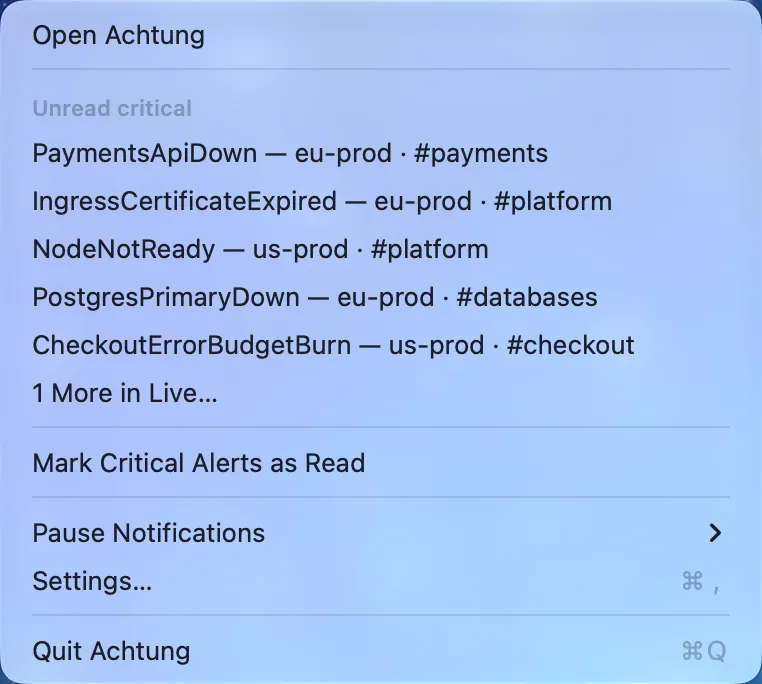
New and resent critical alerts arrive as macOS notifications (warnings too, if you like), with Mark as Read and Silence right on them. The alert you are already looking at doesn't get a banner.

How it works

Alertmanager stays the brain: routing, grouping and inhibition stay where they are. achtunk8s is the inbox.

Each clusterAlertmanagera webhook receiver per channel
POST /ingest/alertmanager/{instance}/{channel}
One containerachtunk8s serverNode.js, Fastify, PostgreSQL
REST APIchange stream soon
On your MacmacOS appSwift, SwiftUI
Alertmanager posts to the server, the server keeps every alert and its history in Postgres, and the Mac app reads them through the API. The server also reads each Alertmanager's API for Home and silences, and Grafana IRM's API for heartbeats.

Alert identity

An alert is its source, its channel and, for Alertmanager, its fingerprint: a hash of the full label set. One firing, from start to resolve, is an occurrence. Ingest is idempotent, because Alertmanager retries and repeats every notification.

What a notification does to an occurrence
StoredIncomingEventMeaning
nothing yetfiringfiredA new alert, or a new occurrence of a known one.
firingfiringnoneThe notification updates the alert in place. Nothing is new.
firing, quiet for an hourfiringresentA reminder that it still fires. Not counted as new.
firingresolvedresolvedIt updates in place, not as a new message.
resolvedfiringreopenedAlertmanager resolved it too early.

ADR 0007: alert identity and history

Silences through the server

The app asks the server, and the server creates, changes or ends the silence on the Alertmanager the alert came from. The Mac never needs Alertmanager's credentials, and silences made in Alertmanager show up too.

ADR 0008: silences through the server

Delivery you can trust

Home compares what each Alertmanager has with what arrived. An alert still firing here that Alertmanager dropped, a missed resolve, is resolved after five minutes and marked vanished in its history.

ADR 0014: vanished occurrences

Watchdog and IRM heartbeats

Each Home tile shows whether its Alertmanager's Watchdog fires and whether Grafana IRM still receives its heartbeat. Alert names that fire forever by design stay out of the counts.

ADR 0012: IRM heartbeat

Search on the server

Search runs in Postgres across every channel and instance: free text in names, summaries and labels, exact labels, severity and instance.

ADR 0017: search

Notifications on the Mac

The app polls every 30 seconds, with or without a window, and notifies about new and resent critical alerts. What arrived while it was closed notifies once when it starts again within a day, and nothing is announced twice.

ADR 0013: notifications

No accounts, by design

There are no users and no login. Everyone who can reach the server sees every alert, so keep it inside your network or VPN, or behind an authenticating proxy.

ADR 0002: no authentication

In progress and next

The decisions behind each step are written down as ADRs and plans in the repository.

  1. In progress

    Live change stream

    A Server-Sent Events stream tells the app the moment something changes: a new alert, a silence, a setting. New alerts show up and notify within moments instead of at the next 30-second poll. The stream only says what changed, so a client that misses an event loses nothing.

  2. Planned

    Dead man's switch

    Every alert today says that something fired. When the whole cluster, or the way out of it, is gone, nothing fires and silence looks like health. A small witness outside the cluster expects heartbeats and alerts when they stop. Deep heartbeats carry each Alertmanager's Watchdog and the last ingest, so a broken alert path is caught too, not only total failure.

  3. Planned

    Investigate with an agent

    One button hands an alert to a coding agent. A worker on a machine you choose picks up the request, the agent investigates read-only, and its findings come back into the alert for everyone to see. Alert data is treated as untrusted input.

  4. Planned

    Acknowledge, notes and more sources

    Acknowledging alerts, flapping detection and per-alert notes, built on alert history. Alertmanager is the first source; the server is built for others, such as Grafana, Uptime Kuma or your own scripts.

  5. Future

    Teams working on alerts together

    Today there are no users and no sign-in: everyone who can reach the server sees the same inbox. Later, people could sign in with your identity provider over OIDC and work on alerts together: notes on an alert, comments on alerts and events in Live, maybe light messaging. That replaces the no-users decision, so it starts with a new ADR.

Run your own

achtunk8s is early. There are no published images or app downloads yet, so you build both from the repository. It runs where your alerts are: one container and a Postgres database.

  1. Build and run the server

    One container image with no build step. It applies database migrations on start, writes nothing to disk and runs with a read-only root filesystem. Needs PostgreSQL.

    git clone https://github.com/stibi/achtunk8s.git
    cd achtunk8s
    docker build -t achtung .
    docker run -p 8080:8080 \
      -e DATABASE_URL=postgres://achtung@db.example.internal:5432/achtung \
      -e PGPASSWORD=… \
      achtung
  2. Point Alertmanager at it

    One webhook receiver per channel. The URL names the instance (usually the cluster) and the channel; a new URL creates the channel.

    receivers:
      - name: payments
        webhook_configs:
          - url: http://achtung:8080/ingest/alertmanager/prod-eu/payments
            send_resolved: true
  3. Let it read each Alertmanager

    Optional, for Home and silences: tell the server where each instance's Alertmanager API is. Set it from a secret when it holds credentials. For IRM heartbeats, add IRM_API_URL andIRM_API_TOKEN, and the instance's irmIntegrationId.

    ALERTMANAGERS='{
      "prod-eu": {"url": "http://alertmanager:9093", "irmIntegrationId": "CABC123"},
      "staging": {"url": "https://alertmanager.staging.example.com",
                  "username": "achtung", "password": "…"}
    }'
  4. Install the Mac app

    Needs macOS 27 and Xcode. Build it into ~/Applications, then set the server address in Settings. To look around first, make demo starts it against a fake server with made-up alerts.

    brew install xcodegen
    make install